⚙️
OpenAPI-aware tool generation
Convert Robyn routes into MCP tools automatically. Safe GETs become read tools, POSTs become action tools, and input schemas are inferred from your API contracts.
robyn-mcp exposes tools, resources, and prompts from existing Robyn apps with risk metadata, approval-ready annotations, OpenAPI inspection, upstream gateway invocation, observability, validation, and a polished playground.

from robyn import Robyn
from robyn_mcp import RobynMCP, RobynMCPConfig

app = Robyn(__file__)

@app.get("/customers/:customer_id")
async def get_customer(customer_id: str):
    return {"customer_id": customer_id, "status": "active"}

mcp = RobynMCP(
    app,
    config=RobynMCPConfig(
        require_session=False,
        enable_playground=True,
        enable_tool_tracing=True,
    ),
)

mcp.mount_http()
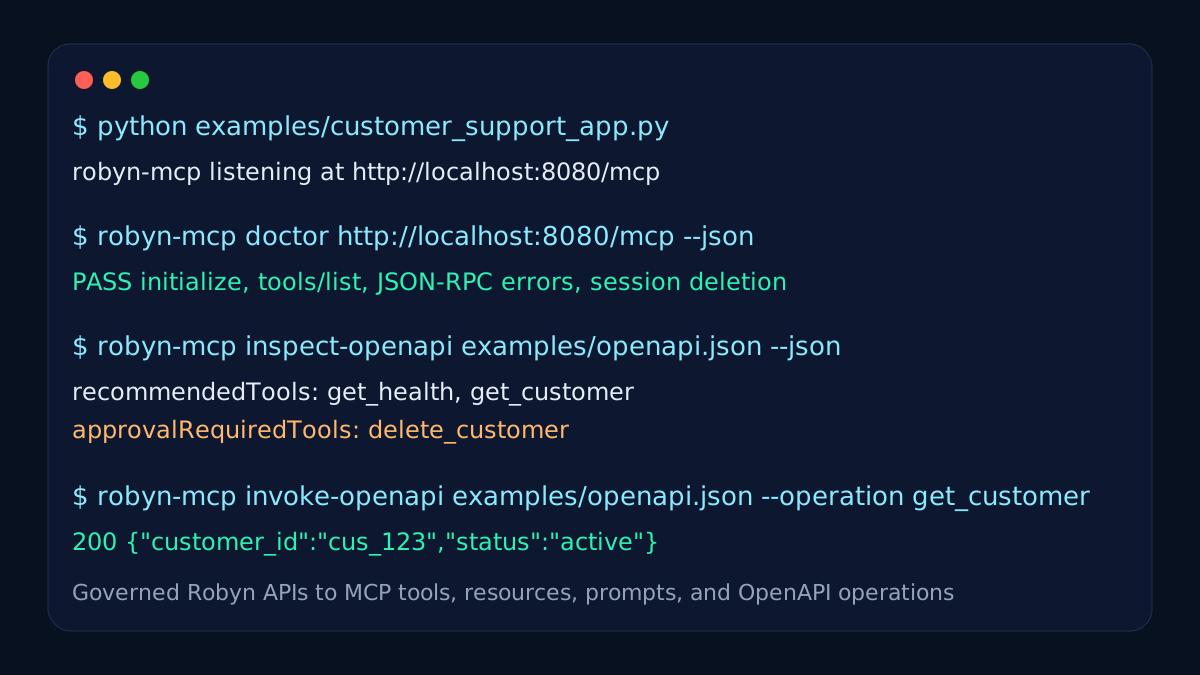
app.start(port=8080)See the core path from an existing Robyn app to a governed MCP surface: route discovery, browser inspection, endpoint health checks, OpenAPI scoring, and upstream invocation.
python examples/customer_support_app.py
robyn-mcp doctor, inspect-openapi, and invoke-openapi
make generated tools reviewable before release.
Open /mcp/playground, list tools, review risk metadata, and call the read
customer tool.
Everything users expect from a modern MCP adapter: automatic discovery, strongly structured tool schemas, browsable resources, reusable prompts, governance metadata, and instant live inspection.
Convert Robyn routes into MCP tools automatically. Safe GETs become read tools, POSTs become action tools, and input schemas are inferred from your API contracts.
Expose structured context through MCP resources and reusable prompt templates so clients can discover more than just callable actions.
Track calls, errors, average latency, and recent events to understand real usage and debug issues faster during local and production testing.
Cache frequent read tools to reduce backend load, then invalidate by cache tags from mutation tools so clients always see fresh data after updates.
Inspect, validate, benchmark, invoke OpenAPI operations, and audit your endpoint with built-in tooling designed to make release checks much easier.
Evaluate OpenAPI contracts, invoke selected upstream operations, and discover FastAPI operations
through app.openapi() without adding a hard FastAPI dependency.
Ship a modern browser-based playground that lets developers initialize sessions, list tools, read resources, resolve prompts, and call methods instantly.
Tools carry risk, approval, auth, permission, cache, and contract-quality annotations so teams can review what agents are allowed to do.
Header forwarding, session management, JSON-RPC handling, transport metadata, and configurable feature flags give you a clean v1 deployment path.
API-to-MCP generation will become common. The stronger project is the one that makes generated tools safe, observable, policy-controlled, and verifiably compatible.
Read-only, mutation, deletion, financial, credential, admin, sensitive-data, and external-communication categories.
Dangerous operations can be marked as approval-required and audited before production use.
Generated tools are scored for names, descriptions, schemas, output schemas, and safety metadata.
Tool: delete_customer

Risk: data_deletion
Approval: required
Schema quality: scored
Audit: enabled

Operation sources:
Robyn → OpenAPI → FastAPIrobyn-mcp reports supported protocol versions, feature flags, transport status, and client matrix hints. Verification labels are backed by repeatable client tests.
robyn-mcp doctor http://localhost:8080/mcp --json checks metadata, initialize,
capability negotiation, tool discovery, protocol reporting, and production warnings.
robyn-mcp inspect-openapi ./openapi.json --json reports recommended tools,
approval-required actions, filtered operations, risk categories, and contract scores.
robyn-mcp invoke-openapi ./openapi.json --upstream http://localhost:8000 --operation get_health
calls one upstream operation using path, query, body, and header rules from the contract.
robyn-mcp runtime --json lists protocol checks, Streamable HTTP status, planned stdio
work, optional SSE, and client compatibility states.
Measure OpenAPI inspection, contract scoring, and release regressions with CLI commands that produce machine-readable output for CI, release notes, and comparison reports.
Run repeated inspections against the same contract and track min, mean, median, and max latency.
Compare robyn-mcp and FastAPI MCP benchmark JSON files, then publish a markdown summary.
Benchmarks are designed for regression tracking before releases, without relying on hosted services.
robyn-mcp benchmark-openapi examples/openapi.json \
  --iterations 50 --json

{
  "iterations": 50,
  "operationCount": 6,
  "minMs": 0.91,
  "meanMs": 1.18,
  "medianMs": 1.12,
  "maxMs": 1.83
}Keep your Robyn app exactly where it is. Add robyn-mcp, mount the endpoint, and let clients discover capabilities over a clean MCP surface.
Create a RobynMCP instance around your existing Robyn application.
Turn on OpenAPI autogen, prompts, resources, playground, and tracing through config flags.
Use mcp.mount_http() and immediately expose discovery, tool calls, resource
access, and prompt retrieval.
curl -s http://localhost:8080/mcp \
  -H 'content-type: application/json' \
  -H 'accept: application/json' \
  -d '{"jsonrpc":"2.0","id":1,"method":"initialize","params":{}}'

curl -s http://localhost:8080/mcp \
  -H 'content-type: application/json' \
  -H 'accept: application/json' \
  -H 'mcp-session-id: ...' \
-d '{"jsonrpc":"2.0","id":2,"method":"tools/list","params":{}}'robyn-mcp is useful anywhere developers want existing APIs to feel discoverable and assistant-ready without rewriting their app stack.
A Nike-style product backend can expose inventory lookup as tools, store context as resources, and sales playbooks as prompts for team assistants.
Turn health checks, deployment status, environment metadata, and release-note prompts into one MCP surface for faster team workflows.
Expose billing actions, tenant context, diagnostics, and support prompts while keeping the original Robyn API intact under the hood.
Perfect for developers who already have a Robyn application and want MCP support, governance metadata, discovery, observability, and a polished playground with minimal setup.
python -m pip install --upgrade pip
pip install robyn robyn-mcp
robyn-mcp doctor http://localhost:8080/mcp --jsonfrom robyn import Robyn
from robyn_mcp import RobynMCP, RobynMCPConfig
app = Robyn(__file__)
@app.get("/health")
async def health():
return {"status": "ok"}
mcp = RobynMCP(app, config=RobynMCPConfig(require_session=False))
mcp.mount_http()
app.start(port=8080)The essentials developers usually want to know before adopting the library.
No. robyn-mcp wraps your existing app. You keep your routes and add MCP capabilities around them.
Yes. You can expose MCP resources and prompts, not just callable tools.
Yes. With OpenAPI autogeneration enabled, supported routes can be surfaced as MCP tools automatically. You can also inspect and benchmark standalone OpenAPI documents.
Run robyn-mcp doctor http://localhost:8080/mcp --json before connecting production
clients.
Yes. The built-in playground provides a modern UI for metadata, tool calls, resources, prompts, and trace inspection.